Secure Portal
Overview
A desktop assistant that reads an authenticated portal, where the model can propose an action but never perform one.
Details
At a glance
- Project type
- Local-first desktop application
- My role
- Set the security model, designed the application, and implemented the boundary and the shell around it.
- Category
- Systems
- Status
- In development2026
What I did
- Wrote the ten invariants the product is held to, and the sentence it may never say
- Placed the security boundary in code the model cannot reach
- Designed the session, the approval dialogue and the export flow
- Built the adversarial test portal that tries to defeat it
Built with
- Rust: The policy engine, redaction and the audit log, the security-critical half
- Tauri: The desktop shell
- TypeScript: The interface and the browser worker
- Playwright: Driving the isolated Chromium
- SQLite: Records and exports, on the user's own machine
- Ollama: The model, running locally so nothing leaves the computer
Next project
Virksom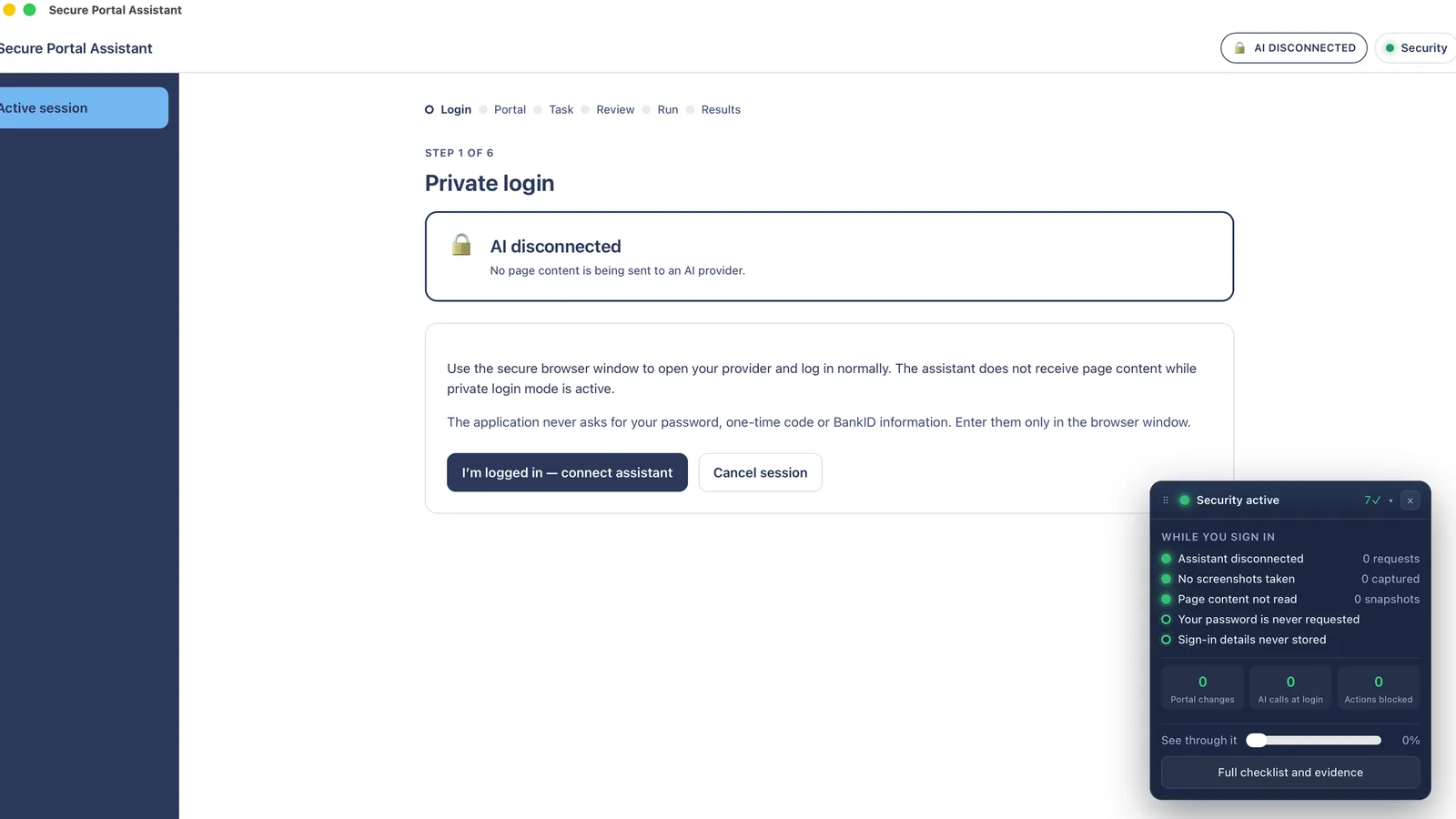
The need
A business runs on portals it has to log into: suppliers, banks, public registers. The information a person actually needs from them is often twenty numbers spread over forty pages, and getting it out is an hour of copying that nobody enjoys and everybody gets wrong occasionally.
An assistant could do it. But an assistant inside a logged-in portal is an assistant standing next to the buttons that place orders and change records, holding a live session it did not have to earn.
Decision
The model proposes, code authorises
- Context
- Prompt injection is not a hypothetical here. A supplier's own PDF, or a line of text on a page, can be written to instruct whatever reads it. If the model is the thing deciding what happens next, then the portal's content is deciding what happens next.
- What I decided
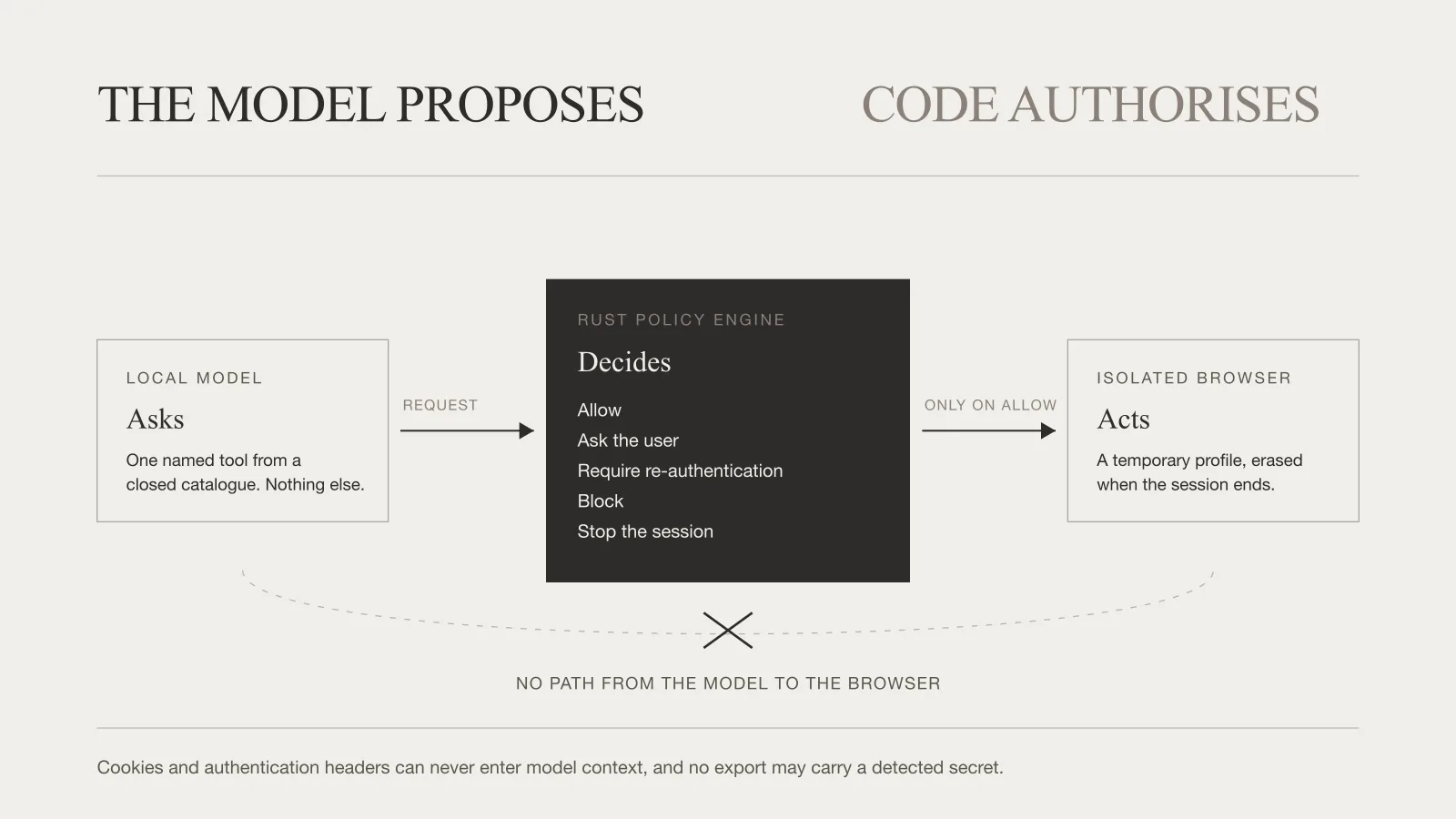
- The model can only request one named tool from a closed catalogue. Every request goes through a policy engine, written in Rust, that returns allow, ask the user, require re-authentication, block, or stop the session. There is no path from the model to the browser at all. The engine has no dependency on the shell, the browser or any model provider, so it can be reviewed on its own.
- Trade-off
- Every new capability has to be added to the catalogue and to the policy by hand, so the product grows more slowly than one that lets the model improvise. In exchange, a page that tries to give it an instruction is talking to something that cannot act.
A browser with no memory
The application opens its own temporary Chromium, separate from the user's real browser. It starts with no saved passwords, no extensions, no autofill, no history and no existing sessions. The person logs in themselves, by hand. The assistant is connected only after they say so, and the whole profile is erased when the session ends.
Sign-in has its own mode, and while it is on the assistant is not merely idle but disconnected: no request is made, no screenshot taken, nothing on that page read. The application never asks for a password, a one-time code or national-identity details. Those are typed into the browser window and nowhere else, and it says so on the screen where somebody would otherwise be about to type one into the wrong box.
When the policy engine wants a person, everything stops and waits. Only an explicit allow performs the action: a timeout, a Stop, a block or a failed message all leave it undone, so there is no path where losing the answer becomes a yes. Every answer is tagged with the question it belongs to, so a late click on an old dialogue cannot approve the action now on screen. And a download can never be granted in advance, because every download is reviewed.
Showing its own working
A session runs in six steps: sign in, choose the portal, set the task, review it, run it, read the results. A panel sits beside all of them saying what is holding right now.
It does not say the words trust us. It counts. While somebody is signing in it reports zero requests made to the model, zero screenshots captured, zero snapshots of the page taken; and it counts the changes made in the portal and the actions blocked as the assistant works. Those are running totals from the session in front of you, not claims about the product in general.
Decision
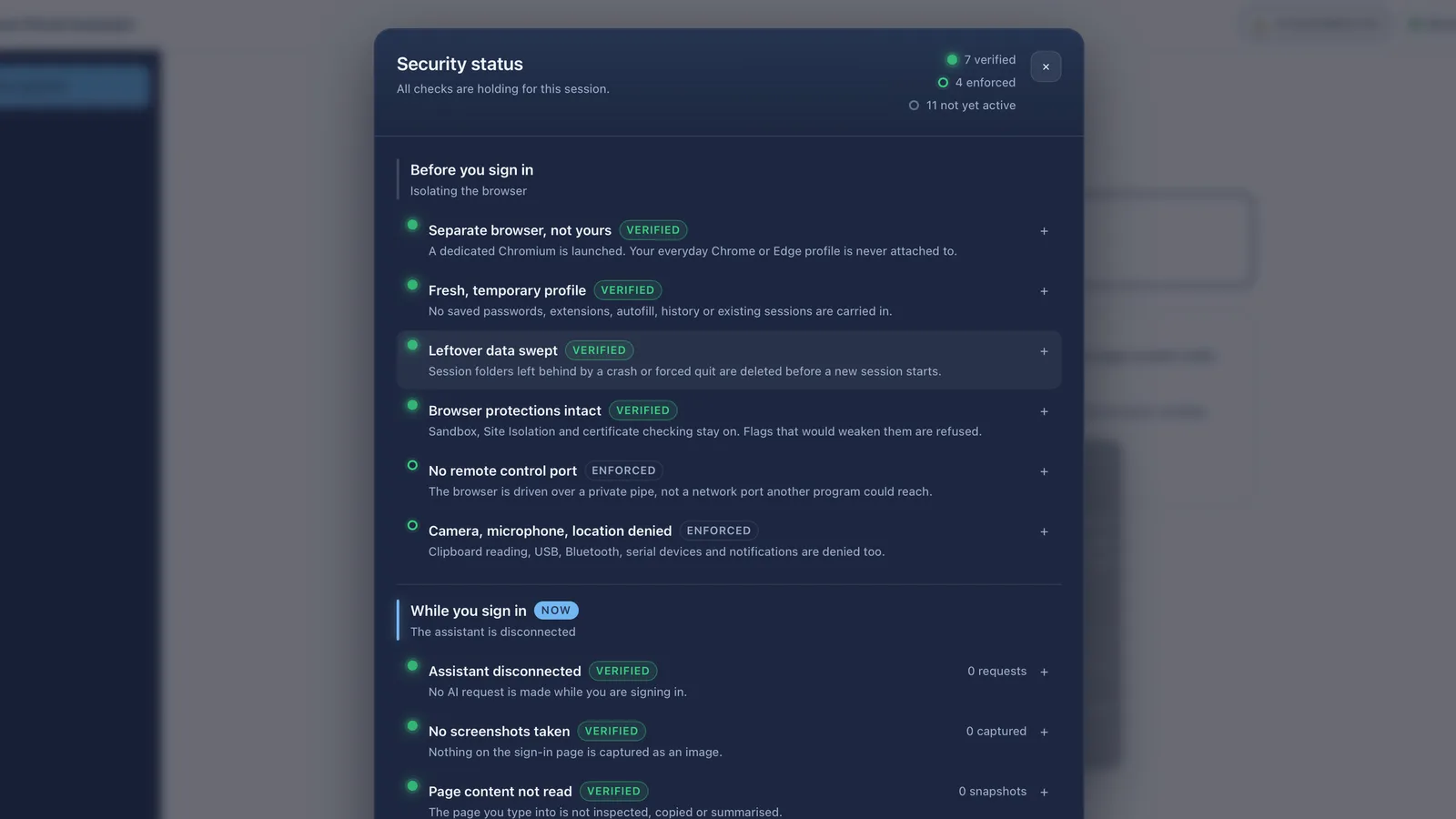
Verified, enforced, or not yet active
- Context
- A security checklist with ticks down the side is the easiest thing in software to fake, because a tick means nothing about when it was last true. Most products show them all green from the moment the window opens.
- What I decided
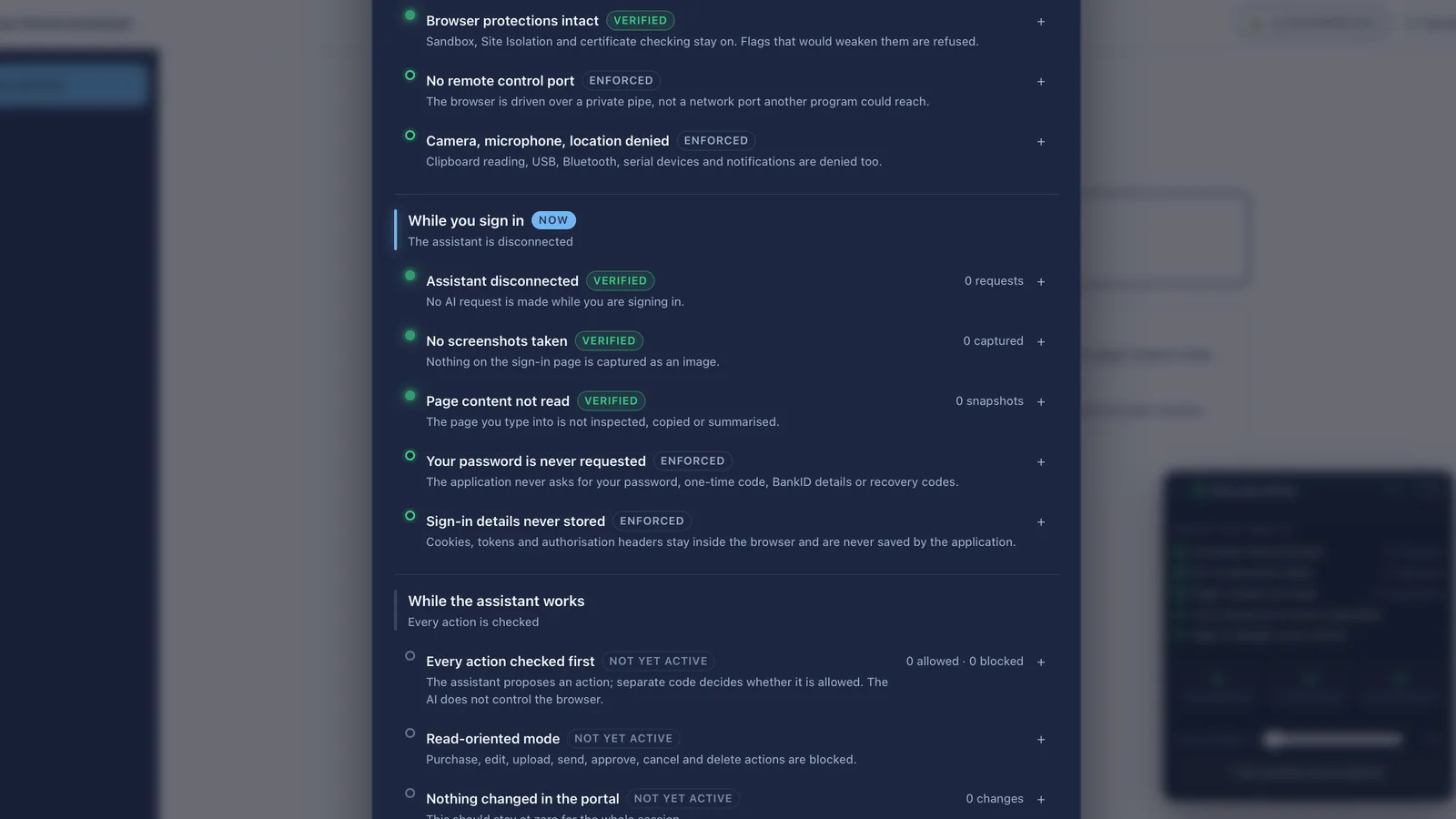
- Each check carries one of three states. Verified means it was measured in this session and the measurement is shown. Enforced means it is a rule the code holds and cannot be turned off. Not yet active means that phase has not started, so nothing is claimed about it at all, and those stay grey rather than green until they are real.
- Trade-off
- It means the panel opens mostly not-green, which looks worse than a wall of ticks. It is also the only version a security officer can read: a check that says nothing yet is worth more than a check that says yes before it has run.
The ten invariants
- The model cannot execute a browser action directly, and a portal adapter cannot bypass the policy engine.
- Login mode cannot issue model requests at all, so nothing is watching while a password is typed.
- Cookies and authentication headers can never be included in model context.
- Automation cannot navigate to an origin that was not approved, and an unknown transactional action cannot be auto-approved.
- Local mode cannot silently fall back to cloud inference.
- A browser profile cannot be reused after a session has been erased.
- An export cannot contain a detected secret pattern.
- Remote portal content cannot invoke a native command in the desktop shell.
- These are tested, not asserted, and the build fails outright if a prohibited browser launch flag appears anywhere in the tree.
- A deliberately adversarial mock portal exists to try to break every one of them: decoy controls, hidden instructions, a state-changing GET, search over POST.
Decision
Turn down the better model
- Context
- A cloud model would be markedly better at the reading. The provider interface would take one cleanly, and the redaction and context-minimisation steps already run before every request, so it was not a technical problem.
- What I decided
- It was declined and written down as declined. Sending page content to a cloud provider would move a customer's authenticated portal data off their machine and out of their control, which contradicts the product's central claim and is a data-protection decision rather than an engineering one. Local stays the default. The middle path left open is cloud for planning only, which sees the typed instruction and never the page.
- Trade-off
- The product is measurably worse at deciding where to look next, and that is its weakest area. The answer to it is a deterministic mode where code chooses the route and the model only reads, rather than a better model with a worse promise.
Where it stands
Six phases are complete, including packaging that runs from the Finder with nothing configured. 341 tests pass, alongside an end-to-end suite against a real browser and live tests against a local model.
It is not released. There is no verified adapter for a real supplier portal, no Windows build, no code signing, and no independent security review, which the project's own specification makes a release blocker rather than a nice-to-have.
The product also refuses to say certain things. Not zero risk. Not the application cannot access the session. Not guaranteed read-only on every website. What it will say is the accurate sentence: it uses the authenticated session to navigate, and the authentication secrets must never reach the model, the logs, a server or another browser profile.